> ## Documentation Index
> Fetch the complete documentation index at: https://docs.iearena.org/llms.txt
> Use this file to discover all available pages before exploring further.
# Existing plugins
> Connect Harbor jobs to observability platforms.
Job plugins run in the Harbor process and react to job and trial events. Pass
them at runtime with `--plugin`; plugins are not stored in `config.json`.
Install a plugin in the same Python environment as Harbor. Plugin credentials
are [Harbor process variables](/core-concepts/jobs/environment-variables), not
agent environment variables.
## Discover plugins
Installed packages register a short plugin name. List them with:
```bash theme={"system"}
harbor plugins list
```
Harbor provides two official plugins: `langsmith` and `atif2otel`.
`harbor plugins list` shows the plugins installed in the environment running
Harbor. A source checkout may already include both as editable workspace
packages; PyPI installations must add the desired plugin package.
You can also pass a full `module:Class` import path to `--plugin`.
## LangSmith
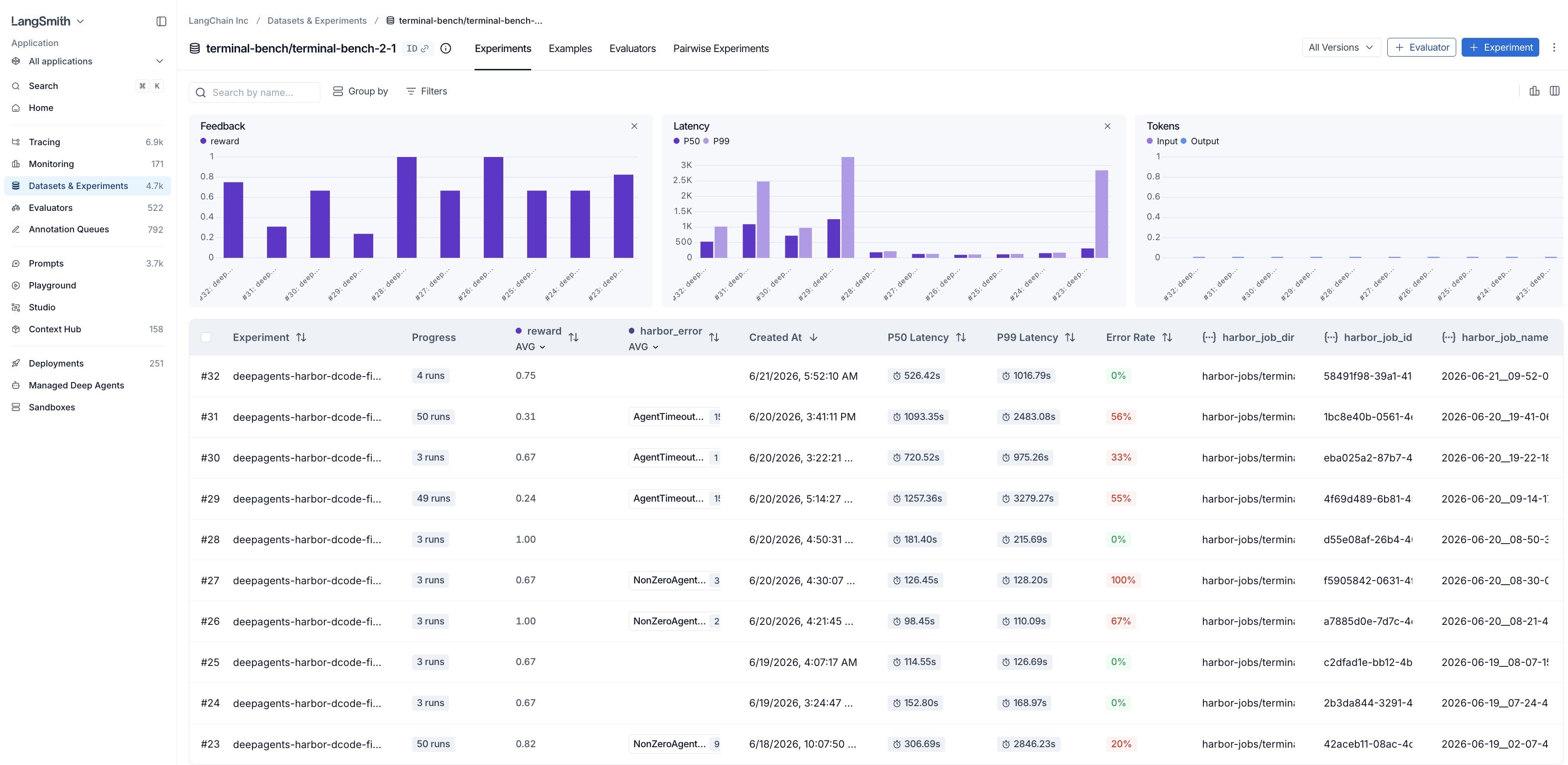
The [LangSmith](https://www.langchain.com/langsmith/observability) plugin syncs Harbor tasks
to a LangSmith dataset and records each job as an experiment.
```bash theme={"system"}
uv tool install "harbor[langsmith]"
```
```bash theme={"system"}
export OPENAI_API_KEY="..."
export LANGSMITH_API_KEY="..."
harbor run \
-t hello-world/hello-world \
-a codex -m openai/gpt-5.6-sol \
--plugin langsmith \
--pk dataset_name=harbor-evals \
--pk experiment_name=codex-baseline
```
 | Option | Environment variable |
| ----------------- | -------------------------------- |
| `dataset_name` | `HARBOR_LANGSMITH_DATASET` |
| `experiment_name` | `HARBOR_LANGSMITH_EXPERIMENT` |
| `experiment_id` | `HARBOR_LANGSMITH_EXPERIMENT_ID` |
| `endpoint` | `LANGSMITH_ENDPOINT` |
| `workspace_id` | `LANGSMITH_WORKSPACE_ID` |
| `sync_dataset` | `HARBOR_LANGSMITH_SYNC_DATASET` |
| `fail_fast` | `HARBOR_LANGSMITH_FAIL_FAST` |
`api_key` is also accepted, but `LANGSMITH_API_KEY` is recommended for
credentials.
See the [LangSmith docs](https://docs.langchain.com/langsmith/harbor-integrations)
and [launch post](https://x.com/LangChain/status/2071972238128005278).
## ATIF to OpenTelemetry
The ATIF-to-OpenTelemetry plugin converts each
agent's [ATIF **trajectory**](/core-concepts/agents/atif) into [OpenTelemetry](https://opentelemetry.io/) spans.
It converts `agent/trajectory.json` into spans for model calls, tool calls, and
subagents.
```bash theme={"system"}
uv tool install --with harbor-atif2otel harbor
```
Export all trials after the job finishes:
```bash theme={"system"}
export OPENAI_API_KEY="..."
harbor run \
-t hello-world/hello-world \
-a codex -m openai/gpt-5.6-sol \
--plugin atif2otel \
--pk output_dir=./otel-traces \
--pk encoding=json
```
The built-in uploader exports each trial to an MLflow server when it
finishes:
```bash theme={"system"}
export OPENAI_API_KEY="..."
export MLFLOW_TRACKING_TOKEN="..."
harbor run \
-t hello-world/hello-world \
-a codex -m openai/gpt-5.6-sol \
--plugin atif2otel \
--pk endpoint=https://mlflow.example.com \
--pk experiment_name=harbor-evals
```
| Option | Environment variable | Default |
| ----------------- | ----------------------------- | --------- |
| `endpoint` | `OTEL_EXPORTER_OTLP_ENDPOINT` | — |
| `output_dir` | `HARBOR_OTEL_OUTPUT_DIR` | — |
| `experiment_name` | `MLFLOW_EXPERIMENT_NAME` | Job name |
| `token` | `MLFLOW_TRACKING_TOKEN` | `""` |
| `workspace` | — | `default` |
| `encoding` | — | `json` |
| `mode` | — | `auto` |
`mode=auto` streams when `endpoint` is set and writes files when `output_dir`
is set. Set both to enable both outputs.
See the [plugin source](https://github.com/harbor-framework/harbor/tree/main/packages/harbor-atif2otel).
## Use multiple plugins
`--plugin` and `--plugin-kwarg` are repeatable. Prefix each kwarg with its plugin
name when using more than one plugin:
```bash theme={"system"}
harbor run ... \
--plugin langsmith \
--plugin atif2otel \
--pk langsmith.experiment_name=codex-baseline \
--pk atif2otel.output_dir=./otel-traces
```
When running from a job config, keep plugin flags on the command line:
```bash theme={"system"}
harbor run --config config.json --plugin langsmith
```
To build another integration, see [Custom plugins](/core-concepts/plugins/custom-plugins).
| Option | Environment variable |
| ----------------- | -------------------------------- |
| `dataset_name` | `HARBOR_LANGSMITH_DATASET` |
| `experiment_name` | `HARBOR_LANGSMITH_EXPERIMENT` |
| `experiment_id` | `HARBOR_LANGSMITH_EXPERIMENT_ID` |
| `endpoint` | `LANGSMITH_ENDPOINT` |
| `workspace_id` | `LANGSMITH_WORKSPACE_ID` |
| `sync_dataset` | `HARBOR_LANGSMITH_SYNC_DATASET` |
| `fail_fast` | `HARBOR_LANGSMITH_FAIL_FAST` |
`api_key` is also accepted, but `LANGSMITH_API_KEY` is recommended for
credentials.
See the [LangSmith docs](https://docs.langchain.com/langsmith/harbor-integrations)
and [launch post](https://x.com/LangChain/status/2071972238128005278).
## ATIF to OpenTelemetry
The ATIF-to-OpenTelemetry plugin converts each
agent's [ATIF **trajectory**](/core-concepts/agents/atif) into [OpenTelemetry](https://opentelemetry.io/) spans.
It converts `agent/trajectory.json` into spans for model calls, tool calls, and
subagents.
```bash theme={"system"}
uv tool install --with harbor-atif2otel harbor
```
Export all trials after the job finishes:
```bash theme={"system"}
export OPENAI_API_KEY="..."
harbor run \
-t hello-world/hello-world \
-a codex -m openai/gpt-5.6-sol \
--plugin atif2otel \
--pk output_dir=./otel-traces \
--pk encoding=json
```
The built-in uploader exports each trial to an MLflow server when it
finishes:
```bash theme={"system"}
export OPENAI_API_KEY="..."
export MLFLOW_TRACKING_TOKEN="..."
harbor run \
-t hello-world/hello-world \
-a codex -m openai/gpt-5.6-sol \
--plugin atif2otel \
--pk endpoint=https://mlflow.example.com \
--pk experiment_name=harbor-evals
```
| Option | Environment variable | Default |
| ----------------- | ----------------------------- | --------- |
| `endpoint` | `OTEL_EXPORTER_OTLP_ENDPOINT` | — |
| `output_dir` | `HARBOR_OTEL_OUTPUT_DIR` | — |
| `experiment_name` | `MLFLOW_EXPERIMENT_NAME` | Job name |
| `token` | `MLFLOW_TRACKING_TOKEN` | `""` |
| `workspace` | — | `default` |
| `encoding` | — | `json` |
| `mode` | — | `auto` |
`mode=auto` streams when `endpoint` is set and writes files when `output_dir`
is set. Set both to enable both outputs.
See the [plugin source](https://github.com/harbor-framework/harbor/tree/main/packages/harbor-atif2otel).
## Use multiple plugins
`--plugin` and `--plugin-kwarg` are repeatable. Prefix each kwarg with its plugin
name when using more than one plugin:
```bash theme={"system"}
harbor run ... \
--plugin langsmith \
--plugin atif2otel \
--pk langsmith.experiment_name=codex-baseline \
--pk atif2otel.output_dir=./otel-traces
```
When running from a job config, keep plugin flags on the command line:
```bash theme={"system"}
harbor run --config config.json --plugin langsmith
```
To build another integration, see [Custom plugins](/core-concepts/plugins/custom-plugins).