

harbor serve runs jobs and manages sandboxes. Clients connect to the same server and see the same jobs; execution continues when a client disconnects.
Start the server
With Docker running, start the server:HARBOR_API_KEY unset for this local example. The examples below use the public hello-world task and the oracle agent, which runs its reference solution. No Hub or model API key is needed.
Use Daytona instead of Docker
Use Daytona instead of Docker
Configure the sandbox provider on the server, then use
"environment": {"type": "daytona"} in your job config, or --env daytona in the CLI.Choose a client
Once the server is running, there are four ways to interact with it:- HTTP / cURL
- Harbor CLI with
--server - Python SDK (
Harbor/AsyncHarbor) - MCP
- HTTP / cURL
- Harbor CLI
- Python SDK
- MCP
Open Submit job, select Local server, leave the Bearer field empty, and click Send on the prefilled example. Or run:
The playground sends real requests from your browser. Allow local-network access if prompted. If blocked, use cURL or
http://127.0.0.1:8390/docs.job_id. For local tasks, use path instead of name; paths refer to the server’s filesystem.
Run Codex with an OpenAI API key
Run Codex with an OpenAI API key
Keep the server running. Supply your OpenAI key per job:Replace
- HTTP / cURL
- Harbor CLI
- Python SDK
- MCP
your-openai-key with your key. This makes real OpenAI API calls; no server restart is needed.Run Codex on Daytona with an OpenAI API key
Run Codex on Daytona with an OpenAI API key
Restart the server with Daytona credentials:Submit the OpenAI key per job using your chosen client:
- HTTP / cURL
- Harbor CLI
- Python SDK
- MCP
Check progress and results
Recommended: use the Harbor viewer to monitor live progress and browse results and artifacts: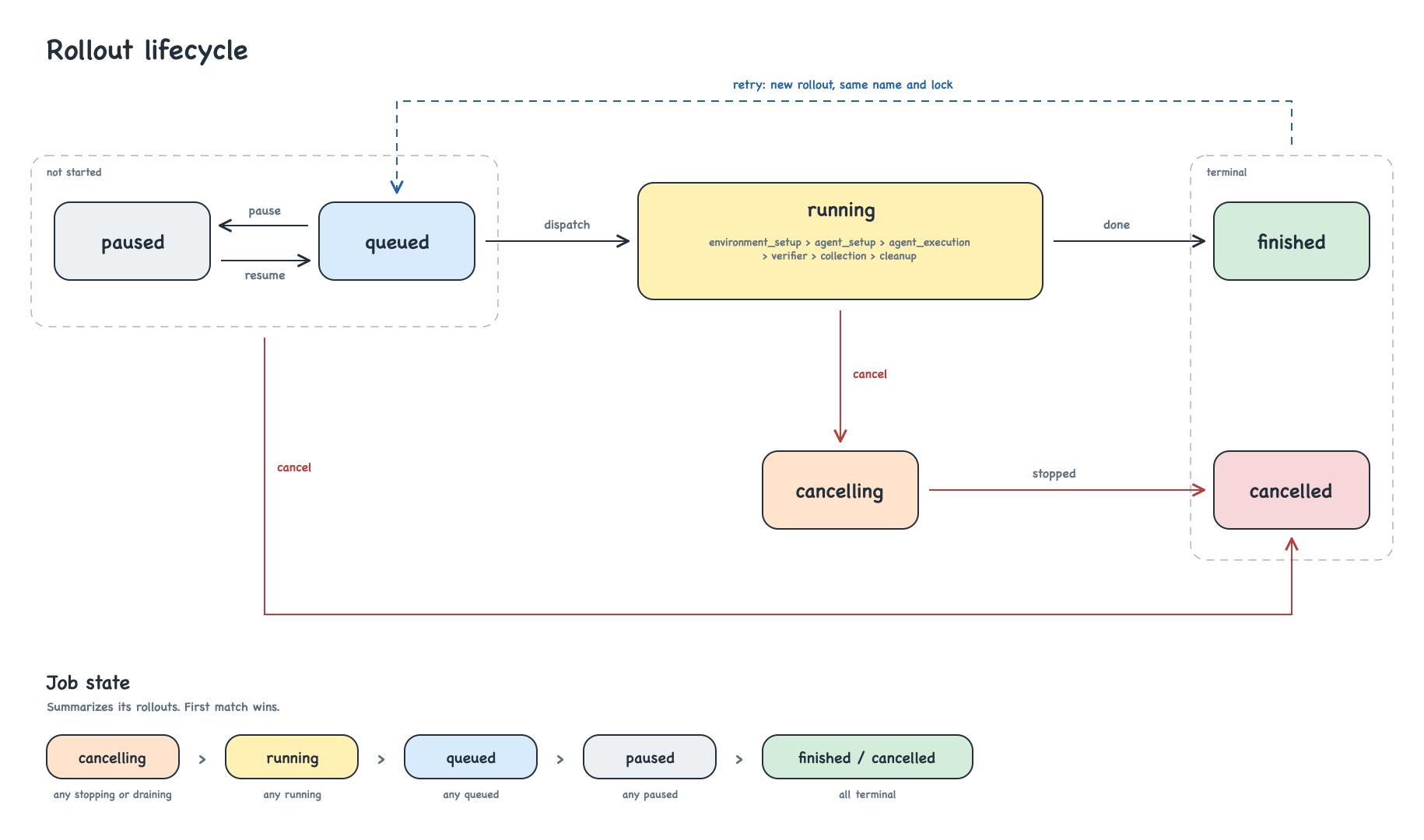
Rollout lifecycle.
Check through the API
Check through the API
Use the returned ID with Get job and List rollouts:Poll until
finished or cancelled. finished means execution ended; inspect rollout error_type and rewards for the outcome.Get rollout returns its full result and artifact URI map. Pass a file URI to Download, or use client.download(uri, destination) to save it locally.Request behavior
Request behavior
- Submit a
JobConfig; optional/jobs/resolvereturns a lock for inspection, not submission. - Lists return summaries and
next_cursor; pass it ascursorwith unchanged filters for the next page. Detail endpoints return full records. - Pause affects queued rollouts. Cancel stops queued and running rollouts;
soft: truelets running rollouts finish. Retry creates a new rollout ID in the same job. - Submission and retry accept
Idempotency-Key(idempotency_keyin the SDK). Reuse it after a lost response; duplicates return409with the original ID. The SDK does not retry requests automatically. - HTTP errors return
{"error": {"code": "...", "message": "..."}}; the SDK raisesharbor.client.APIError.Harbor-API-Versionis optional; the SDK supplies it.
Server settings
Use HTTPS for remote deployments. Set sandbox-provider credentials, such as
DAYTONA_API_KEY, on the server; send model credentials per job through agents[].env. environment.env sets variables inside the sandbox, not provider credentials.
The API & SDK tab has the endpoint reference, and your server exposes its OpenAPI schema at /openapi.json.